When co-parenting feels difficult
Keep a dated record of everyday moments and schedule changes, one entry at a time.
Your account and cloud records were deleted. Local records remain on this device.
Checking your saved sign-in…
Keep your backup file and this browser’s data. Reload to retry recovery of the previous records.
 Whose Day
A SMALL NIGHTLY HABIT
Whether co-parenting is starting to feel rocky, or you're newly separated and just want peace of mind, Whose Day gives you one calm place to keep track. A few taps, a quick note, and you're done for the night.
Sign up with your email. No password to remember.


BUILT FOR TWO MOMENTS
Keep a dated record of everyday moments and schedule changes, one entry at a time.
See how a new parenting rhythm is going, with a personal record you can return to.
HOW IT WORKS
Record who had the kids, what was scheduled, and anything that changed. Add a note or screenshot for context.
Your entries become a dated calendar and diary. Today and yesterday stay editable; older entries become read-only in the app.
Create a dated report to print or share with an attorney, a mediator, or just yourself. Download a CSV backup of your records, too.
SEE IT IN ACTION
Actual app screens with sample data.
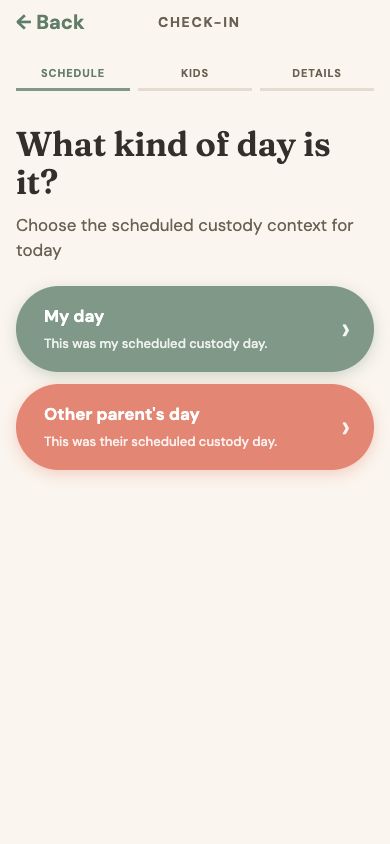
Start with what was scheduled.
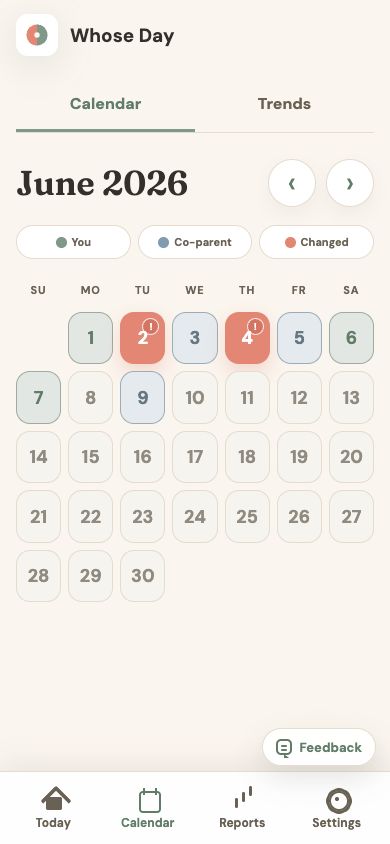
See parenting time at a glance.
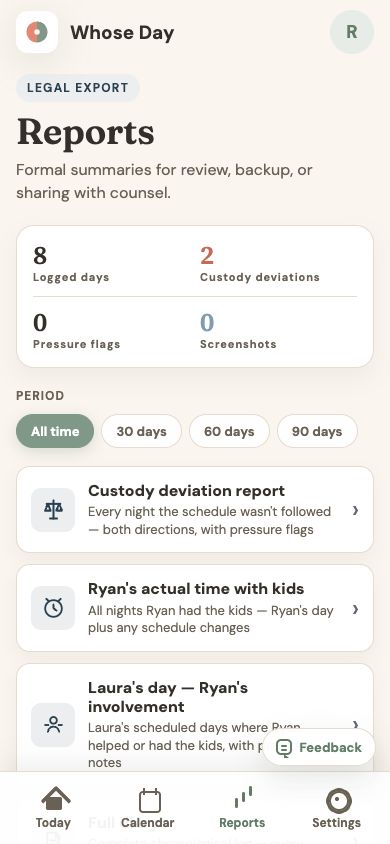
Choose a summary to print or share.
START YOUR RECORD
Create your account with a secure email link, then set up your parenting log.
Already have an account?
QUESTIONS FIRST?
Have a question about getting started?
Email usUse the email for your existing account. We'll send a secure link to restore your profile and records.
Your profile and logs sync automatically while signed in. See our Privacy Policy for storage and email delivery details.
New here?
Already have an account?
This is how you’ll appear in the app and on any reports you generate.
This is how they’ll appear in your logs and summaries.
Don't worry — you can always add more later in Settings.
First names only — just enough to make the app feel personal.
Enter your email and review the agreement. You'll verify your email before starting.
Saved on this device and synced to your account while signed in, including notes and screenshots.
Manage your account, family, and data.
Your profile, sign-in, and sync settings.
Manage your children’s profiles.
Choose how the app looks.
Help improve signup and check-in. Names, email addresses, answers, notes, and screenshots are excluded.
Choose the activities you use most often.
Back up, restore, or export your records.
Manage your records and account.
This name appears in your logs and reports.
Your sign-in email is also used when sharing reports.
Use a name or label you recognize in your logs and reports.
Your profile and records sync automatically while signed in.
These choices appear when you log help with plans.
Keep a copy of your records.
A restorable copy of the settings and records saved on this device, including notes and full screenshot files.
Save this JSON file somewhere safe. It contains your private family records and is not password-protected.
It includes local changes that may not have synced. Records only on another device or in the cloud must sync here first.
Choose a Whose Day JSON backup to review. Nothing changes until you choose Restore selected data.
Use a backup from this account. CSV exports cannot be restored.
Sync your dated entries, notes, and screenshots.
Connect to the internet to manage your account and synced records. Your saved records remain available on this device.
Review what will be removed before continuing.
Connect to the internet to manage your account and synced records. Your saved records remain available on this device.
Good evening
What kind of day is it?
Choose the scheduled custody context for today
Where did the kids stay tonight?
Choose the overnight location first
Did your co-parent help with anything today?
Add help only if it is worth documenting.
Are all three kids sleeping at your house tonight?
Thomas, Presley, and Hayden
Who's sleeping at your place tonight?
Tap each kid with you, then Continue
Where is Presley tonight?
Quick note (optional)
Which kids did your co-parent help with?
Select each child your co-parent was involved with today
Choose everything they helped with. Answer once for the children listed above.
What did your co-parent help with?
Quick note (optional)
Which kids are with your co-parent tonight?
Record what actually happened for your day
Where did the kids stay tonight?
Choose the overnight location first
Did you help with anything today?
Add help only if it is worth documenting.
Quick note (optional)
Choose everything you helped with. Answer once for the children listed above.
What did you help with?
Quick note (optional)
Which kids ended up with you?
Record who was actually with you overnight.
Was this change agreed to in advance?
This helps document whether the change was mutual or unexpected
Anything else to note?
A quick diary entry — how was today?
Logged
Formal summaries for review, backup, or sharing with counsel.
Counts cover the selected period. Custody and schedule changes count family dates, including split days, rather than children or hours. Pressure is user-reported on schedule-change dates. Screenshots counts records with an attachment.
Missing records have unknown custody. Reports reference screenshots without including image files. CSV includes attachment details; it is not a restorable backup or a package of screenshot files.